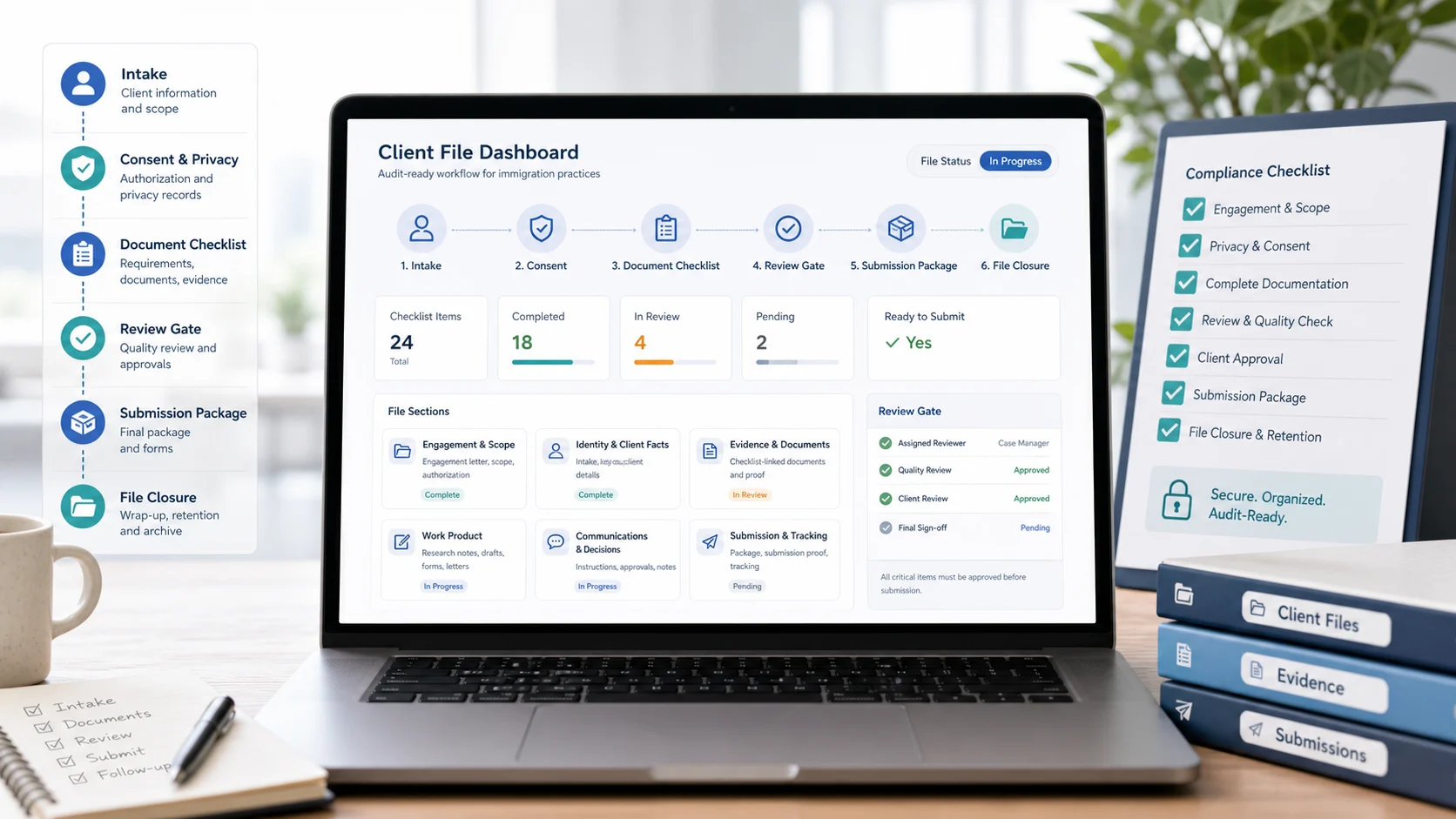
Why “Regulation” Shows Up in File Management Conversations
In practice, “client file management regulation” usually means this: if your work is ever reviewed (by your client, your insurer, your regulator, or another professional stepping in), your file should show what happened, when it happened, who did it, and what you relied on — without reconstructing the story from email threads.
This article is intentionally practical and not legal advice. Always confirm your current professional obligations against up-to-date CICC materials and your own internal compliance program. If you want a checklist-first file structure, start with CICC Client File Management: Practical Compliance Checklist.
As of June 1, 2026, the federal Code of Professional Conduct includes office administration and record keeping expectations for licensees, including maintaining reliable administration systems and preserving records in accordance with applicable by-laws. Treat this guide as an operational planning tool, then verify the current rule text and your firm's own compliance requirements before changing your process.
The “Audit Narrative”: The One Outcome Your File Must Support
A strong file supports an audit narrative with minimal effort. If someone asked you these questions, could your file answer them quickly?
- Authorization: What were you retained to do, and what consents/authorizations exist?
- Facts: What key client facts were relied on, and what changed over time?
- Evidence: What documents were requested/received, and what was reviewed vs. merely uploaded?
- Research: What official sources were used, and when were they checked?
- Work product: What was drafted/submitted, by whom, and which version was filed?
- Decisions: What client decisions, approvals, and risk acknowledgements were recorded?
- Closure: What deliverables were provided, what was billed, and what is the retention plan?
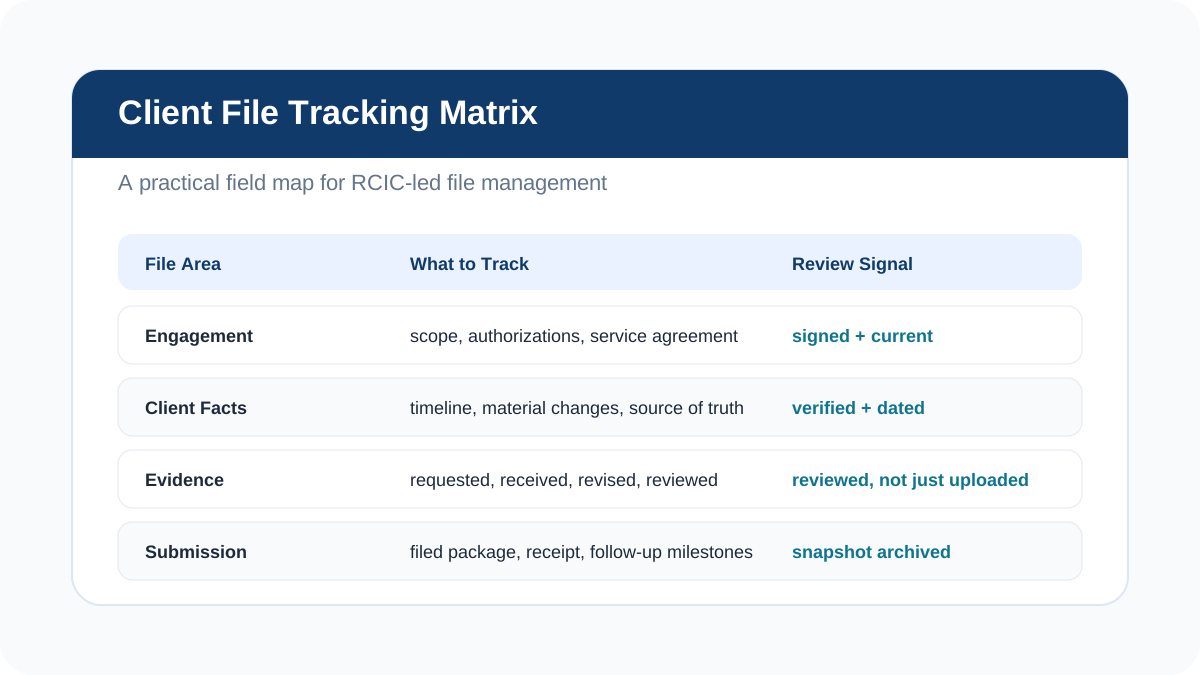
What to Track: A Practical RCIC File Field Checklist
You can implement this in a case management system, a CRM, or even a disciplined folder structure. The key is consistency: the same fields should exist in every file so your team doesn’t invent a new structure for every matter.
1) Engagement + scope control (what you agreed to do)
- Retainer start date, file owner, and service type (e.g., TRV, study permit, PR, employer support).
- Scope statement (what is included vs. excluded) and the client’s confirmation.
- Identity/authorization documents and any third-party rep permissions, where applicable.
- Conflict checks (if your process requires them) and key limitations noted.
- A change-log for scope changes (what changed, who approved, and when).
2) Client facts timeline (what you relied on)
- A single “timeline” note: key dates, status history, travel history highlights, and material events.
- A “facts verification” checkpoint (what was verified vs. client-stated, and any gaps).
- Material changes log (address changes, job changes, marital status, refusals, overstays, etc.).
- Source-of-truth note for names/IDs (avoid drift between passport, forms, and letters).
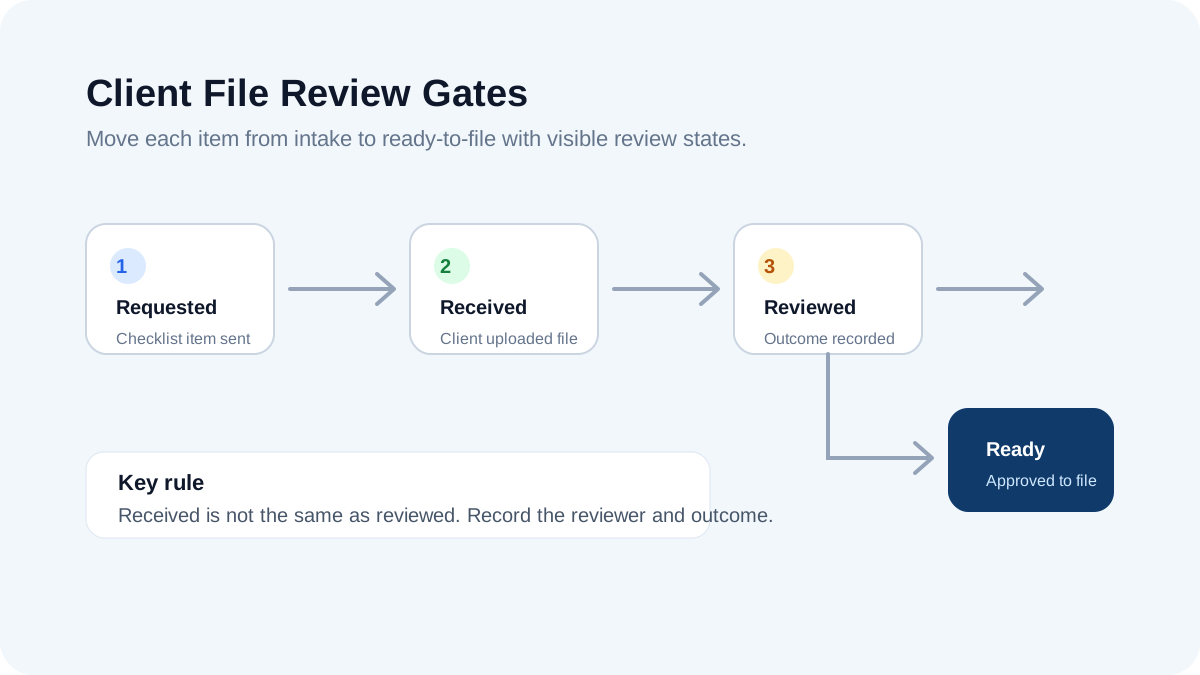
3) Document checklist tracking (requested → received → reviewed)
- A master checklist (by category) tied to the specific application type and client circumstances.
- Status per item (requested, received, needs revision, reviewed/approved, not required).
- Reviewer sign-off: received ≠ reviewed. Record who reviewed and what the outcome was.
- Version labeling for evidence that changes (bank statements, employment letters, translations).
- Packaging notes: where each document appears in the final submission package.
If your team is still using spreadsheets to track “missing items,” consider switching to a checklist-linked workflow like How Immigration Consultants Manage Client Documents Without Spreadsheets.
4) Research & source tracking (what guidance you relied on)
- A “sources used” list for key program guidance (source URL/title, date checked, and notes).
- Assumptions recorded when guidance is unclear (what you assumed and what would change the answer).
- Client-specific risk flags (e.g., gaps, prior refusals) and what steps were taken to address them.
- Template references (what template was used and what was customized).
For a source-backed workflow that makes reviews faster, read How Immigration Consultants Can Save Time on IRCC Research.
5) Work product + submission snapshots (what you actually filed)
- Draft history (who drafted, who reviewed, and which version was approved).
- A “ready-to-file” gate with a checklist (forms complete, signatures confirmed, translations checked).
- A dated submission snapshot: the exact package that was filed (PDF export or archive).
- Submission details: date filed, method, reference numbers, and follow-up milestones.
- Post-submission actions: additional document requests, updates, and responses tracked in one place.
Minimum Viable Compliance System (Even If You’re Folder-Based)
If you are not ready to migrate systems, you can still implement a strong “what to track” standard with a disciplined folder + note template approach. The goal is to reduce ambiguity — ambiguity is what creates rework, handoff problems, and risk.
Suggested top-level structure
- 00 - Engagement (retainer, scope, authorizations, IDs)
- 10 - Facts (timeline, key notes, change log)
- 20 - Evidence (checklist + client documents + translations)
- 30 - Research (sources, notes, templates used)
- 40 - Work Product (drafts, forms, letters)
- 50 - Submission Snapshots (filed packages, receipts, trackers)
- 60 - Communications (key approvals and decisions)
- 99 - Closure (deliverables, billing summary, retention notes)
The difference-maker is your review gates. If your team can only implement one habit, make it this: every “received” item must have a recorded review outcome before it becomes “ready.”
Where VisaFlow AI Fits (Without Replacing Professional Judgment)
VisaFlow AI is designed to support productivity and organization — not to replace RCIC professional judgment. In a compliance-minded file system, tools like VisaFlow can help your team:
- Standardize checklists: keep a consistent structure across file types.
- Reduce “lost context”: centralize key notes, timelines, and source lists.
- Improve handoffs: make it clear what’s pending, reviewed, and ready-to-file.
Learn more about how VisaFlow supports consultant workflows on Features or reach out via Contact.
Quick start: 5 fields to add to every file this week
- Scope + authorization summary (one paragraph).
- Master checklist with status per item (requested/received/reviewed).
- Sources used (what you relied on + date checked).
- Submission snapshot link (exact filed package).
- Closure checklist + retention note (what’s delivered and how long to retain).
FAQ
Not necessarily. Many firms start with folders and shared drives. What matters is consistency: scope records, checklist tracking, review outcomes, source notes, and a dated submission snapshot.
Conflating “received” with “reviewed.” If you can’t show a review outcome for key evidence (and who reviewed it), it’s hard to defend the quality of your process during a handoff or audit.
Use a simple rule: keep one clearly named “current reviewed version” plus any prior versions that matter for explanation (e.g., corrected employment letters). Put older versions in a subfolder or label them clearly.
Avoid copying large chunks of web text. Instead, store a source list: link/title, date checked, and a short note on what you relied on. This keeps the file lighter and easier to update.
Build privacy into the file system: least-privilege access, clear sharing rules, and a defined retention/secure disposal process. For VisaFlow-specific practices, review the Privacy page.
Professional Disclaimer
VisaFlow AI provides productivity and research workflow support for immigration professionals. It is not a law firm and does not provide legal advice. You are responsible for verifying information against official sources, maintaining client confidentiality, and exercising professional judgment in every matter.
For more information on how we approach data handling, see Privacy.