What Traditional Immigration Case Management Software Does
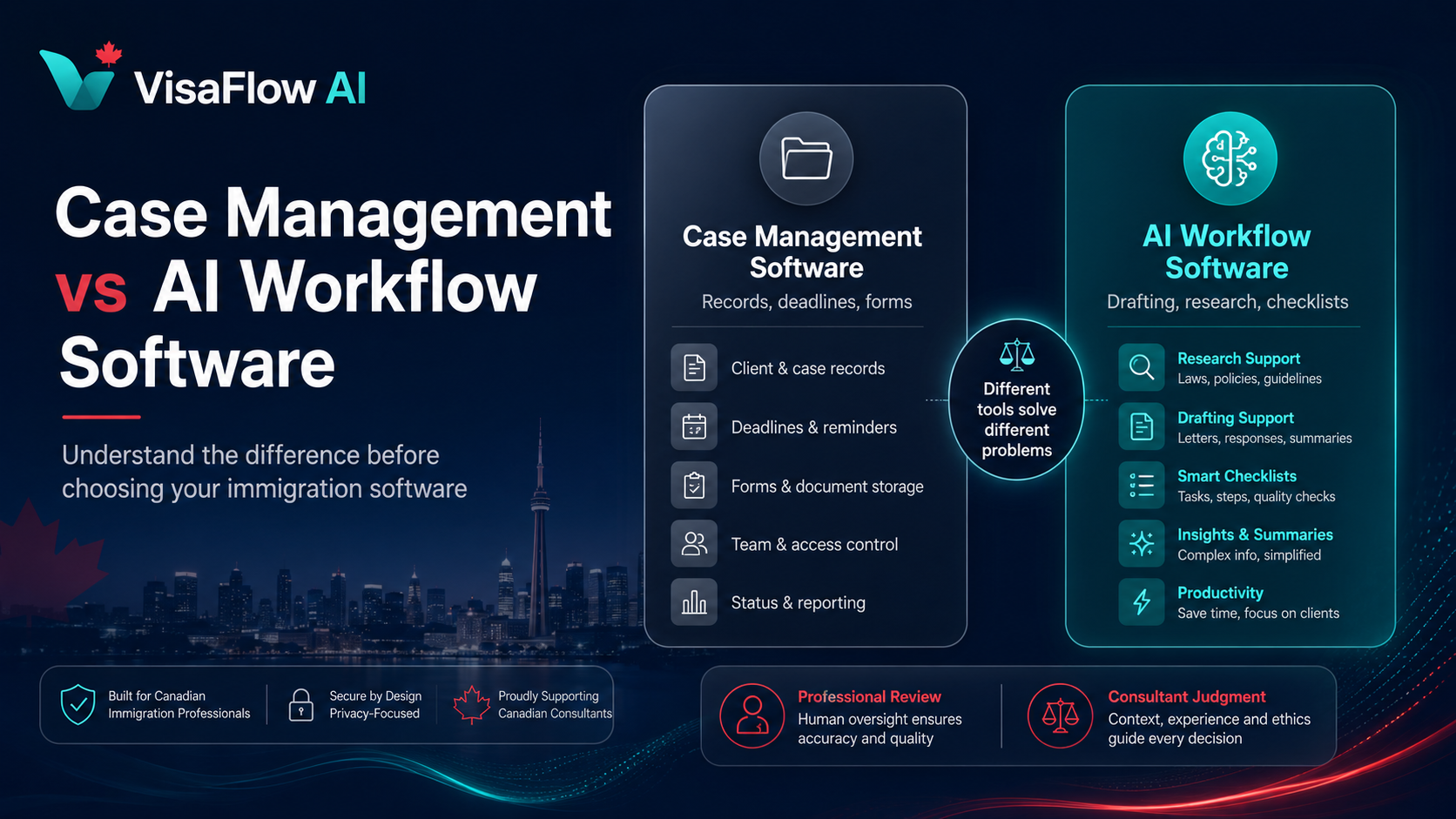
Traditional immigration case management software is designed to serve as a central database for client and case information. These systems focus on record-keeping, operational tracking, and structured data management. They are valuable for firms that need a single source of truth for every file.
Typical capabilities include:
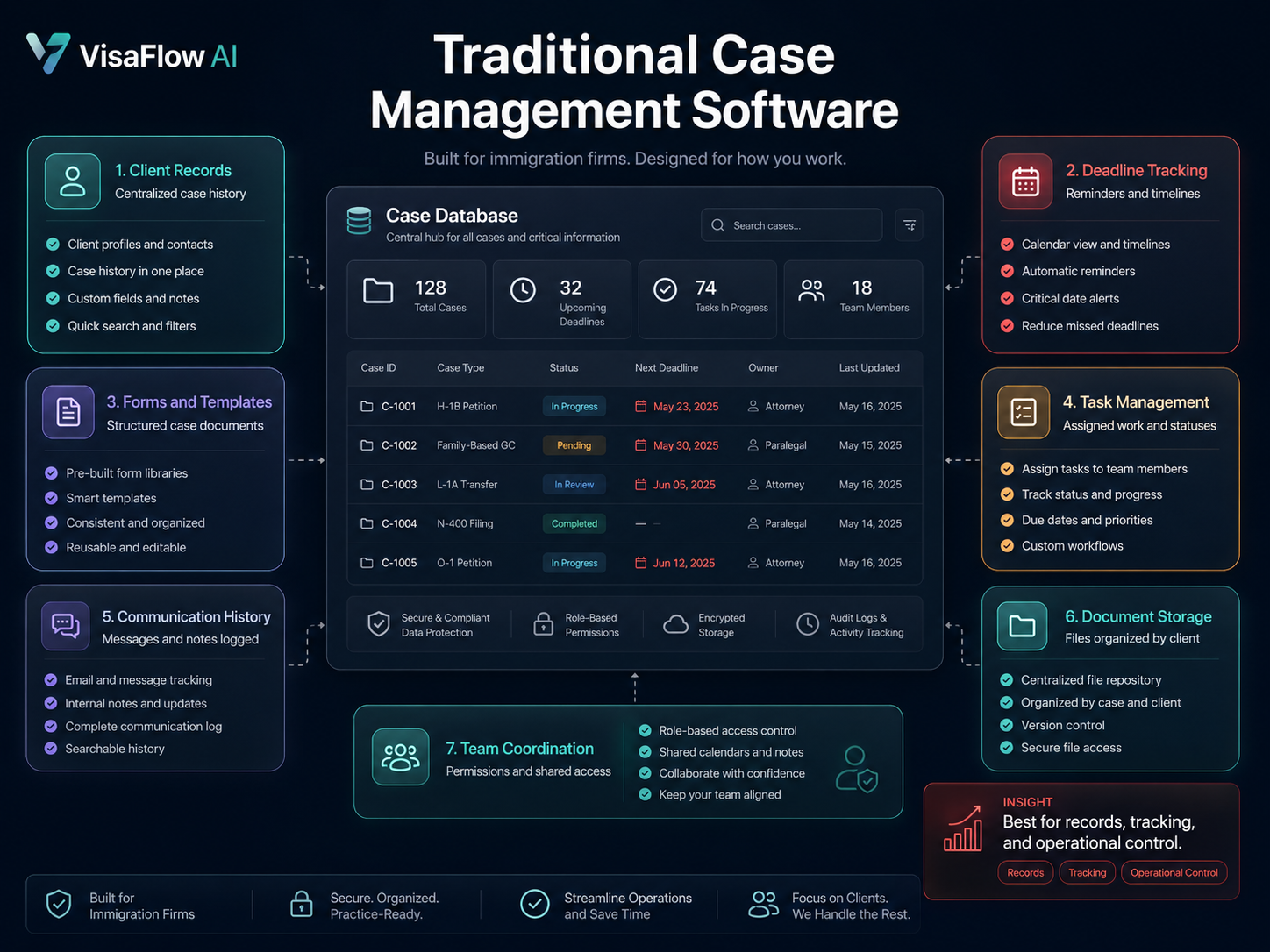
- Client records. A centralized repository for contact details, case history, notes, and related documentation linked to each client or family.
- Deadline tracking. Calendar views, reminder systems, and automated alerts for important dates, renewals, and processing timelines.
- Forms and templates. Pre-built or customizable forms for common immigration applications, often with data populated from client records.
- Task management. To-do lists, assignment features, and status tracking to keep cases progressing through defined stages.
- Communication history. Logs of client interactions, email correspondence, and notes from calls or meetings attached to the case record.
- Document storage. Organized file uploads, version control, and folder structures for client-supplied documents and generated forms.
- Team coordination. Shared access to case files, permission controls, and audit logs for firms with multiple team members.
These features are essential for organized practice management. However, traditional case management systems are not designed to reduce the time spent on repetitive drafting, summarize case information, or actively support research workflows. They store information but do not help process it more efficiently.
What AI Workflow Software Does Differently
AI workflow software for immigration consultants takes a different approach. Instead of functioning primarily as a database, it acts as a productivity layer that helps consultants complete repetitive tasks faster. While case management software helps you store and track information, AI workflow software helps you use that information more efficiently.
Where AI workflow software differs most noticeably:
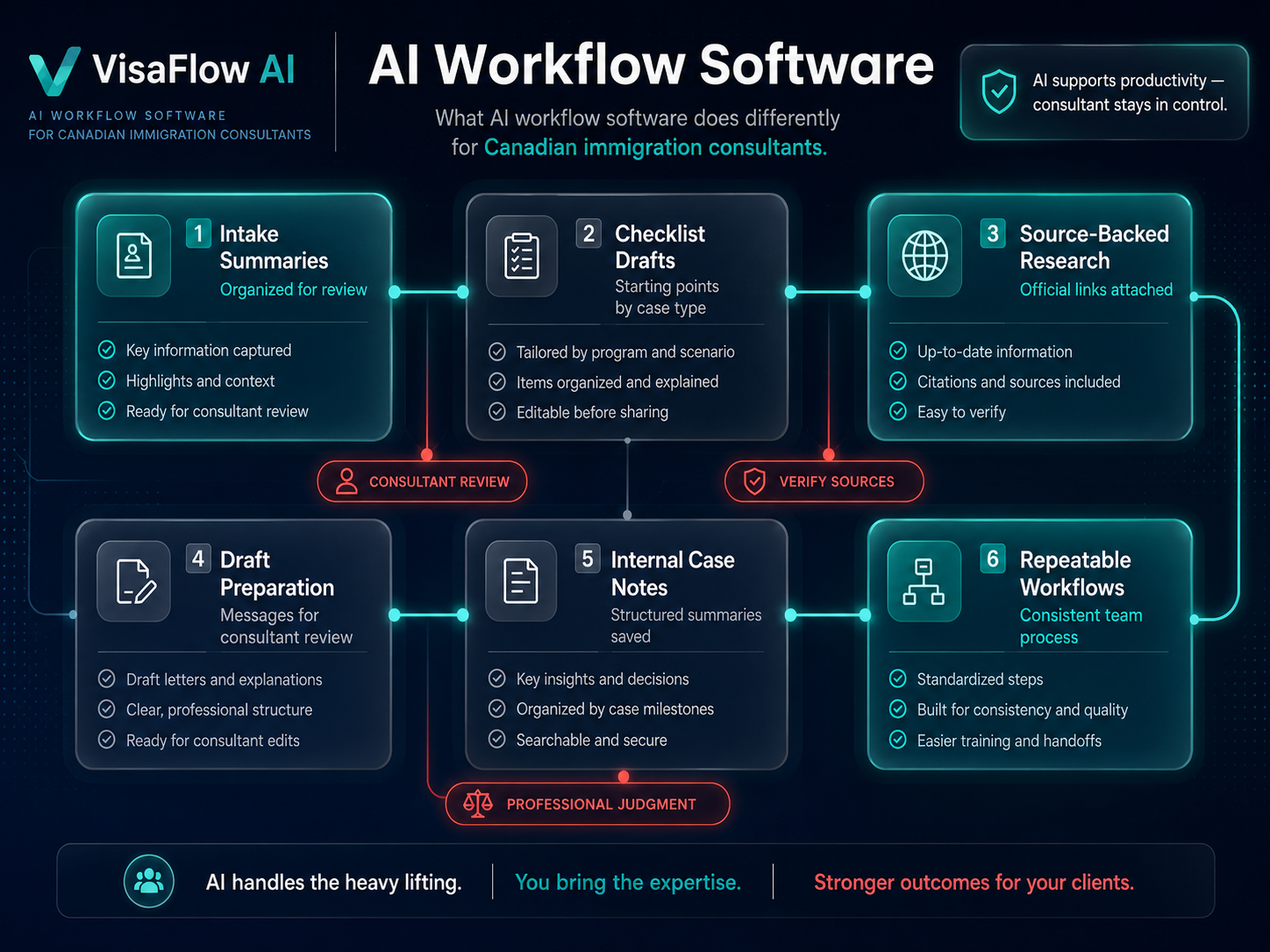
- Intake summarization. When a new client provides intake information, AI can help organize it into a structured summary that the consultant reviews and customizes, rather than requiring manual note-taking from scratch.
- Document checklist support. AI can generate a starting checklist based on the application category, which the consultant adjusts for the specific client and situation. This eliminates recreating checklists manually for each file.
- Source-backed research organization. Finding IRCC program requirements, document lists, and policy information can be time-consuming. AI-assisted tools can help locate relevant information from official sources and organize it with source references for consultant verification.
- Draft preparation support. AI can produce first drafts of client messages, follow-up reminders, intake requests, and internal notes. The consultant reviews, edits, and finalizes each draft before use.
- Internal case notes. Case notes, review summaries, and status updates often follow consistent patterns. AI can draft these from case context, reducing documentation time while keeping the consultant in control.
- Repeatable workflows. AI helps standardize how common tasks are done across files, making it easier for teams to maintain consistent processes without manual oversight.
- Reducing repetitive admin work. By handling structured and predictable tasks, AI workflow software frees consultants to focus on professional review, client work, and judgment-based decisions.
The key distinction is that AI workflow software supports the consultant's productivity without replacing their judgment. Every AI-assisted output requires professional review before it can be relied upon.
Comparison: Traditional Case Management vs AI Workflow Software
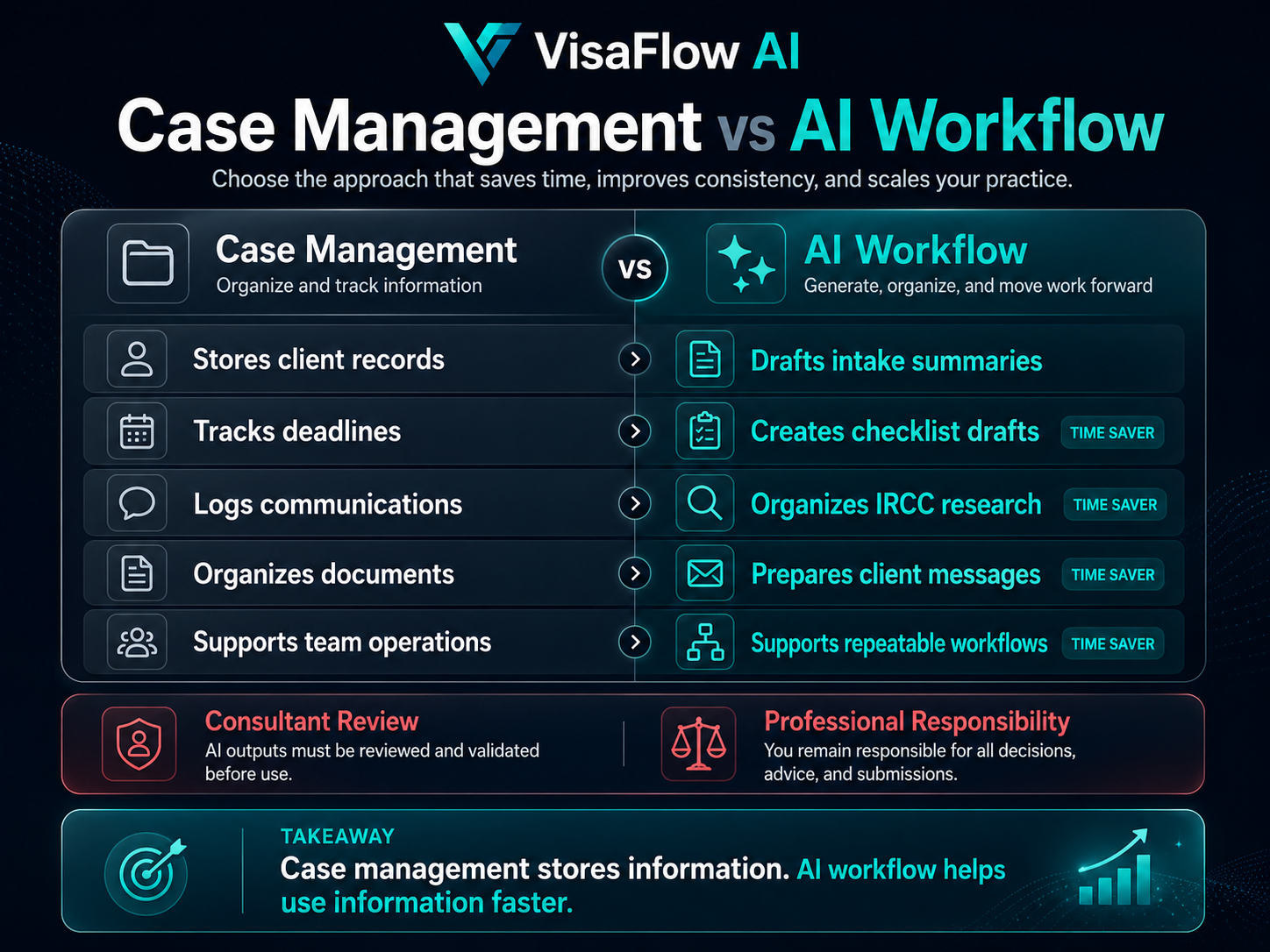
The table below shows how traditional immigration case management software compares with AI-assisted workflow software across common workflow areas:
| Workflow Need | Traditional Case Management Software | AI Workflow Software |
|---|---|---|
| Client intake | Manual entry of client details into structured records | AI-assisted intake summaries that the consultant reviews and customizes |
| Document checklists | Manually created per client using templates or spreadsheets | AI-generated checklist drafts based on application type, reviewed by consultant |
| Case notes | Handwritten or typed notes stored in case records | AI-drafted case note summaries from case context, finalized by consultant |
| Research organization | Separate bookmarks, browser tabs, and external note-taking | Source-backed research support with organized IRCC information and references |
| Client communication drafts | Written from scratch for each follow-up or status update | AI-assisted draft generation with consultant review before sending |
| Team consistency | Depends on manual training and shared templates | Standardized AI-assisted workflows that reinforce consistent processes |
| Productivity gains | Limited to what templates and manual processes provide | AI reduces time on drafting, organizing, and repetitive tasks |
| Professional review | Consultant reviews all information and makes decisions independently | Same — consultant always reviews and decides. AI is a support layer only |
The two categories are not mutually exclusive. Many firms benefit from using both — a traditional system for records and operational tracking, plus AI workflow software for drafting, organization, and research productivity.
When a Firm Needs Case Management Software
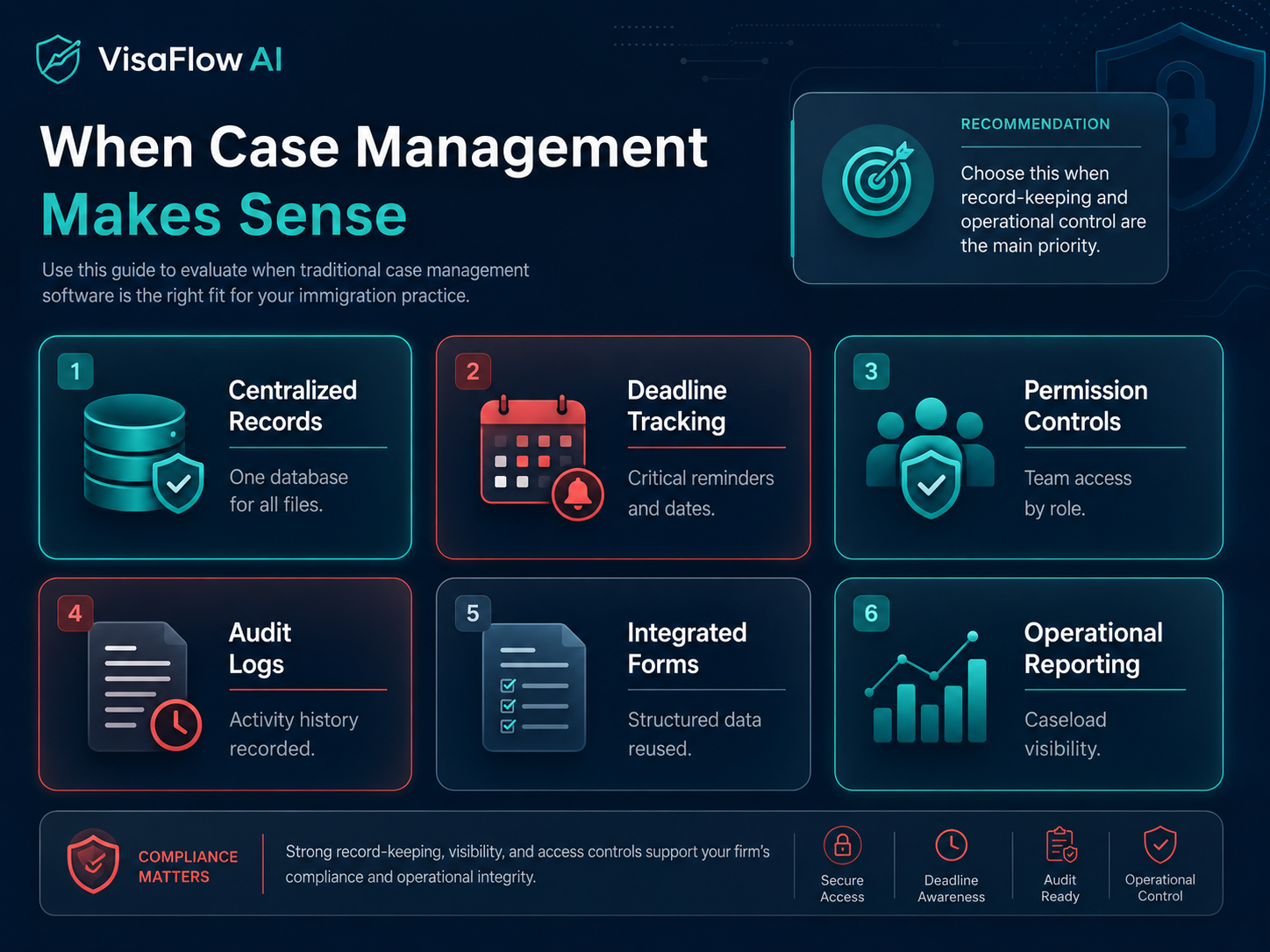
Traditional case management software is the right choice when a firm's primary need is structured record-keeping and operational control. Signs that your firm may benefit from traditional case management software include:
- You need a centralized database for all client records with strict data fields and reporting.
- Deadline tracking and automated reminders are critical for your workflow.
- Your firm requires detailed audit logs and permission controls for regulatory compliance.
- You manage a high volume of files and need robust search and filtering capabilities.
- Your team relies on integrated form-filling and document generation from structured data.
- Operational reporting — such as caseload summaries, stage analysis, or team performance — is a priority.
Firms that need these capabilities will find traditional case management software indispensable. The trade-off is that these systems generally do not reduce the time spent on drafting, research, or repetitive workflow tasks.
When a Firm Needs AI Workflow Software
AI workflow software is valuable when a firm wants to reduce repetitive admin work and improve productivity without changing how records are managed. Signs that AI workflow software may be a good fit include:
- You spend significant time drafting the same types of client messages and follow-ups.
- Document checklists are recreated from scratch for each new client or application type.
- Research involves searching across multiple IRCC pages and trying to keep findings organized.
- Case notes and internal preparation documents follow repeatable patterns that could be drafted faster.
- Your team needs consistent workflows but lacks the time to build and enforce them manually.
- You want to reduce context-switching between separate tools for records, drafting, and research.
AI workflow software is not about replacing professional judgment. It is about reducing the time spent on tasks that are structured and repeatable so that consultants can focus on the work that requires their expertise.
Why Many Immigration Firms May Use Both
For many immigration firms, the best approach is not a choice between one or the other. AI workflow software functions well as a productivity layer on top of existing case management tools. The AI layer handles drafting, organization, and research support while the case management system continues to serve as the record of record.
The risk with using separate systems is information fragmentation — the same client data living in multiple places, requiring manual synchronization. Tools that combine organizational basics with AI-assisted productivity features can reduce this friction. The goal should be fewer tools that cover more of the workflow, not more tools that each handle a narrow piece.
For solo consultants and small teams, a single well-designed platform that covers both record-keeping and AI-assisted productivity is often the most practical solution.
Where VisaFlow AI Fits
VisaFlow AI is an AI-assisted workflow platform designed for Canadian immigration professionals. It focuses on the productivity side of immigration work — helping consultants organize client intake, create document checklist workflows, support source-backed research, and prepare internal case notes — while keeping professional review at the center.
VisaFlow AI supports:
- Client intake organization. Structured intake workspace instead of scattered emails and notes.
- Document checklist workflows. Reusable draft checklists for common application types with tracking of received documents.
- Source-backed research organization. Find and organize IRCC program requirements and document information with AI-assisted source support.
- Internal preparation notes. Keep case notes and review findings organized per client file.
- Repeatable workflows. Standardized processes that help teams work consistently across every file.
VisaFlow AI does not replace professional judgment. It supports productivity while ensuring the consultant remains in control of every review and decision.
See the VisaFlow AI features page for a full overview of the workspace. For pricing, visit the pricing page. For a broader overview of immigration consultant software built for Canadian workflows, visit the dedicated page. For questions, contact the VisaFlow AI team.
Compliance and Professional Responsibility Considerations
Whether using traditional case management software or AI workflow tools, immigration consultants must maintain professional standards and regulatory compliance. Here are important considerations:
- AI tools should not provide final legal or immigration advice. AI-generated drafts, summaries, and research notes are workflow aids. The consultant must review and verify all outputs against official sources before relying on them.
- Consultants remain responsible for review and judgment. No software can replace the professional judgment of a licensed immigration consultant. The consultant is ultimately responsible for every client file, communication, and application.
- Avoid entering unnecessary sensitive personal information. Be thoughtful about what client data is shared with AI tools. Choose platforms designed for professional use with appropriate data handling practices.
- Use source-backed workflows. When AI tools provide research or program information, verify it against official IRCC sources. Do not rely on AI summaries without source confirmation.
- Maintain privacy and professional standards. Immigration professionals handle sensitive personal information. Ensure any software used follows security best practices and supports your professional obligations around privacy and record-keeping.
- VisaFlow AI is not affiliated with IRCC. It is an independent productivity tool. Users must verify all information against official government sources.
Checklist for Choosing the Right Software
Use this checklist to evaluate whether a software platform fits your practice needs:
Software Evaluation Checklist
- Does it improve client intake collection and organization?
- Does it support reusable document checklist workflows?
- Does it help organize IRCC research with source references?
- Does it support your team's existing processes without adding friction?
- Does it make professional review easier, not harder?
- Does the vendor avoid unsafe claims about guarantees or IRCC affiliation?
- Does it fit your privacy and data handling requirements?
- Does it help save time without replacing professional judgment?
For a broader overview of what Canadian immigration consultants should look for in software, read Best Immigration Consultant Software in Canada: What Consultants Should Compare.
Frequently Asked Questions
Immigration case management software is a platform that helps immigration professionals store and organize client records, documents, tasks, deadlines, and communication history in a central system. It functions as a structured database designed for tracking case information across the lifecycle of an immigration file.
AI workflow software for immigration consultants is a productivity platform that uses AI assistance to help with drafting client communications, organizing document checklists, summarizing case notes, and supporting source-backed research. It reduces repetitive admin work while keeping professional review in control.
Not necessarily. AI workflow software can complement or reduce the need for traditional case management tools, but the right choice depends on your practice needs. Many consultants benefit from tools that combine record-keeping with AI-assisted productivity features.
Yes. Many Canadian immigration consultants and RCICs use AI tools to support workflow productivity. AI can help draft messages, create checklist drafts, organize research, and summarize notes. Professional review of all AI-generated outputs against official sources is always required.
No. VisaFlow AI is a productivity and workflow support tool. It does not provide legal advice, immigration representation, or any service that requires licensing as a regulated immigration professional. All outputs must be reviewed and verified by a qualified consultant or authorized team member.
No. VisaFlow AI is not affiliated with IRCC, the Government of Canada, or CICC. It is an independent productivity software product designed for Canadian immigration professionals. Users should always verify information against official IRCC sources.
VisaFlow AI is built for Canadian immigration consultants, RCICs, immigration law support teams, and small to mid-size immigration firms who want to organize client intake, document workflows, research, and internal preparation with AI-assisted productivity tools.
Yes. AI-assisted workflow software can help create reusable document checklist drafts for common immigration application types, track which documents have been received, and flag outstanding items. The consultant reviews and customizes each checklist before use.
VisaFlow AI is designed to support immigration consultant workflow productivity. It does not provide legal advice, replace professional judgment, guarantee immigration outcomes, or imply affiliation with IRCC or the Government of Canada. All outputs must be reviewed and verified against official sources by the consultant or authorized team member.